Machine Learning Integration
Many ML and data science workflows are Python-first, while mature logic synthesis data structures and algorithms are
predominantly implemented in C/C++ toolchains. Without reusable infrastructure, projects often reimplement synthesis
functionality in Python or rely on brittle wrappers and file-conversion scripts around external tools. aigverse
addresses this gap by exposing native AIG construction, manipulation, optimization, and analysis through an idiomatic
Python API, and by providing optional adapters for graph and numeric representations. This enables reproducible dataset
generation, feature extraction, and downstream model experimentation from within standard Python workflows.
Adapters
Adapters are the interoperability layer for ML and data science workflows. To keep the base library lightweight, they
are optional and installed via the adapters extra only when needed. See the
Installation documentation for more details.
Dataset Generation
The generators module offers a reproducible way to create synthetic AIG datasets before converting them into ML-ready formats.
 1import random
 2
 3from aigverse.generators import random_aig
 4
 5rng = random.Random(1234)
 6
 7# Generate a reproducible, size-diverse AIG dataset
 8dataset = [
 9    random_aig(
10        num_pis=rng.randint(4, 6),
11        num_gates=rng.randint(20, 40),
12        seed=5000 + i,
13    )
14    for i in range(16)
15]
16
17print(len(dataset), dataset[0].num_pis, dataset[0].num_gates)
16 5 23
NetworkX
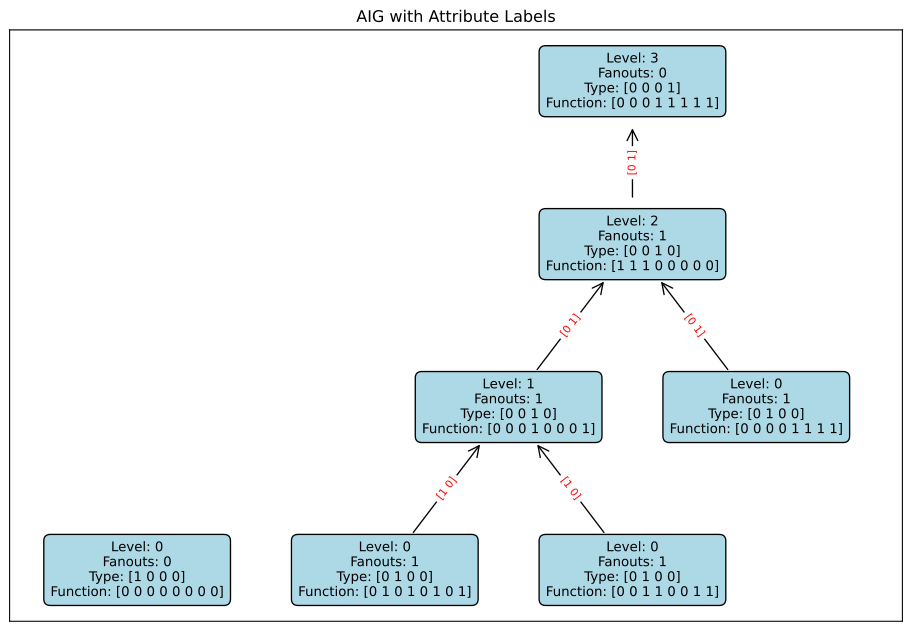
The NetworkX adapter allows you to convert an AIG into a DiGraph object.
This enables use of graph-analysis and graph-learning tooling that operates on NetworkX graphs. Once converted, you can
extract node and edge features, visualize the structure (e.g., with Matplotlib), or feed
the graph into downstream model pipelines.
 1import matplotlib.pyplot as plt
 2import networkx as nx
 3from networkx.drawing.nx_agraph import graphviz_layout
 4import numpy as np
 5
 6from aigverse.networks import Aig
 7import aigverse.adapters
 8
 9# Create a sample AIG
10aig = Aig()
11a = aig.create_pi()
12b = aig.create_pi()
13c = aig.create_pi()
14f1 = aig.create_and(a, b)
15f2 = aig.create_or(f1, c)
16aig.create_po(f2)
17
18# Convert the AIG to a NetworkX graph
19G = aig.to_networkx(levels=True, fanouts=True, node_tts=True, dtype=np.int32)
20
21# Generate the initial layout using Graphviz's 'dot' program
22pos = graphviz_layout(G, prog="dot")
23
24# Invert the y-axis to flip the layout upside down
25# This places the primary inputs (level 0) at the bottom
26for node, position in pos.items():
27    pos[node] = (position[0], -position[1])
28
29# Prepare the labels for nodes and edges from graph attributes
30node_labels = {
31    node: f"Level: {data['level']}\nFanouts: {data['fanouts']}\nType: {data['type']}\nFunction: {data['function']}"
32    for node, data in G.nodes(data=True)
33}
34edge_labels = {(u, v): data["type"] for u, v, data in G.edges(data=True)}
35
36# Plot the graph
37plt.figure(figsize=(12, 8))
38plt.title("AIG with Attribute Labels")
39
40# Draw the graph structure (just the edges and arrows)
41nx.draw_networkx_nodes(G, pos, node_size=0)
42
43# Draw the node labels with a bounding box
44nx.draw_networkx_labels(
45    G,
46    pos,
47    labels=node_labels,
48    font_size=10,
49    bbox={"facecolor": "lightblue", "edgecolor": "black", "boxstyle": "round,pad=0.5"},
50)
51
52# Draw the network edges
53nx.draw_networkx_edges(
54    G,
55    pos,
56    node_size=5000,
57    arrows=True,
58    arrowstyle="->",
59    arrowsize=20,
60)
61
62# Draw the edge labels to show edge attributes
63nx.draw_networkx_edge_labels(G, pos, edge_labels=edge_labels, font_color="red", font_size=8)
64
65# Pad and show the plot
66plt.margins(x=0.2)
67plt.show()
Truth Tables
Truth tables can be easily converted to Python lists or NumPy arrays, making them compatible with
standard ML libraries such as scikit-learn, PyTorch, or
TensorFlow. Since TruthTable objects are iterable, this conversion is direct and
intuitive. You can use these arrays as labels or features in supervised learning tasks, or as part of a dataset for
training and evaluating models.
 1from aigverse.utils import TruthTable
 2import numpy as np
 3
 4# Create a simple truth table, e.g., a 3-input majority function
 5tt = TruthTable(3)
 6tt.create_from_hex_string("e8")
 7
 8# Export to a list
 9tt_list = list(tt)
10print(f"As list: {tt_list}")
11
12# Export to NumPy arrays of different types
13tt_np_bool = np.array(tt)
14print(f"As NumPy bool array:  {tt_np_bool}")
15tt_np_int = np.array(tt, dtype=np.int32)
16print(f"As NumPy int array:   {tt_np_int}")
17tt_np_float = np.array(tt, dtype=np.float64)
18print(f"As NumPy float array: {tt_np_float}")
19
20
21# These arrays can now be used as labels for an ML model.
22# For example, let's generate the corresponding feature matrix:
23def generate_inputs(num_vars):
24    inputs = []
25    for i in range(2**num_vars):
26        # Convert i to binary and pad with zeros
27        binary = bin(i)[2:].zfill(num_vars)
28        inputs.append([int(bit) for bit in binary])
29    return np.array(inputs)
30
31
32feature_matrix = generate_inputs(tt.num_vars())
33labels = tt_np_int  # Using the integer array as labels
34
35print("\nFeature matrix (X) and labels (y) for ML:")
36print("X:\n", feature_matrix)
37print("y:\n", labels)
As list: [False, False, False, True, False, True, True, True]
As NumPy bool array:  [False False False  True False  True  True  True]
As NumPy int array:   [0 0 0 1 0 1 1 1]
As NumPy float array: [0. 0. 0. 1. 0. 1. 1. 1.]

Feature matrix (X) and labels (y) for ML:
X:
 [[0 0 0]
 [0 0 1]
 [0 1 0]
 [0 1 1]
 [1 0 0]
 [1 0 1]
 [1 1 0]
 [1 1 1]]
y:
 [0 0 0 1 0 1 1 1]